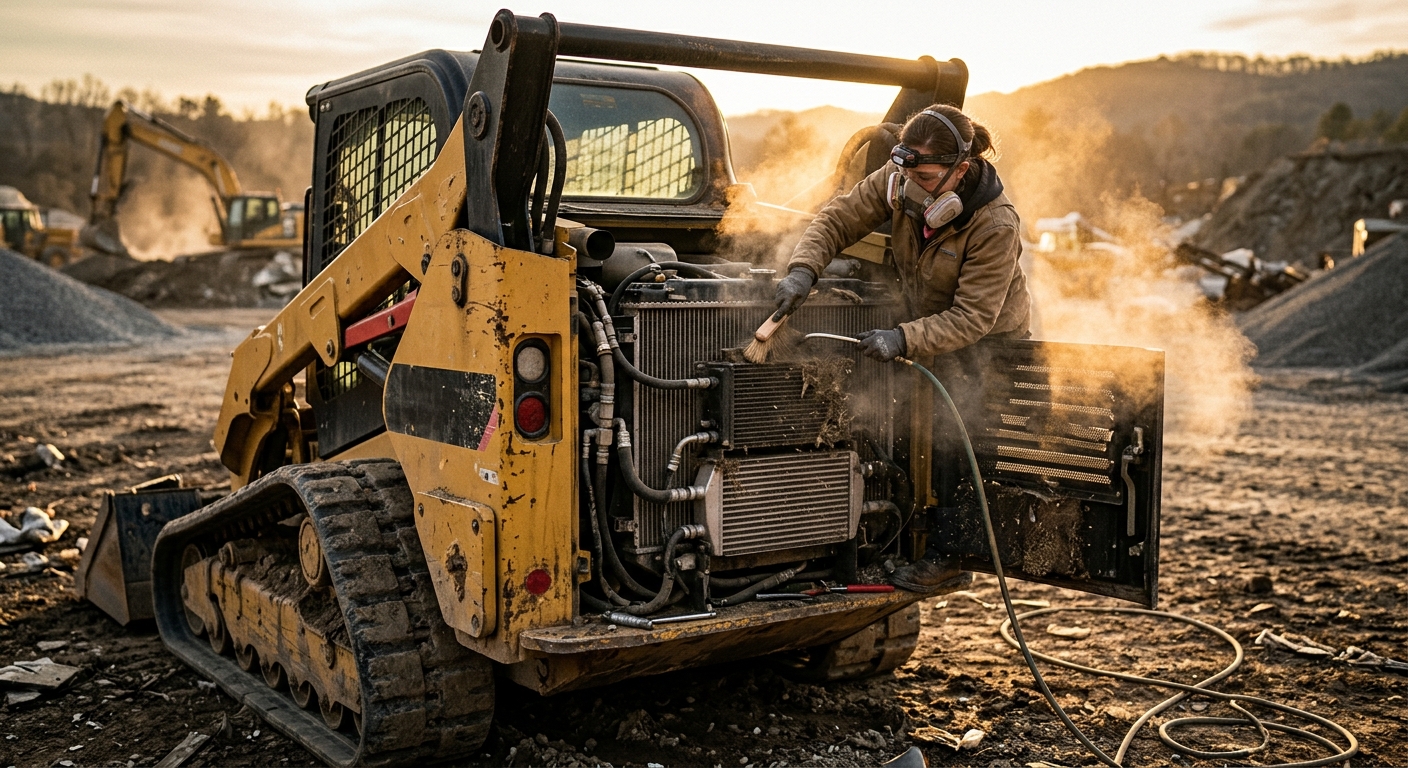
Heavy Equipment Cooling Pack Cleaning Guide: Stop Overheating Before It Starts
Learn how to clean heavy equipment cooling packs, prevent overheating, protect airflow, and avoid expensive downtime in dusty, high-debris jobsites.
Key Takeaways
- Most overheating problems start with restricted airflow, not a failed engine component
- Dust, chaff, mulch, seed fluff, and oily debris can choke a cooling pack in a single shift
- Cleaning the radiator stack the wrong way can bend fins, pack debris tighter, and make the problem worse
- A simple daily airflow routine can prevent shutdowns, derates, and five-figure repair bills
- Tracking cleanings, temp spikes, and debris conditions helps you spot problem machines fast
Overheating gets blamed on thermostats, water pumps, fan clutches, sensors, and mystery gremlins. Sometimes it is one of those things. A lot of the time, though, the real problem is simpler: the machine cannot breathe.
If you run skid steers, excavators, mulchers, wheel loaders, or compact track loaders in dust, grass, bark, sawdust, or demolition debris, your cooling pack is under attack every day. Once airflow drops, coolant temperature rises, hydraulic oil gets hotter, A/C performance falls off, and the machine starts derating right when you need it most.
This is one of those maintenance items that feels small until it ruins your week.
Why cooling packs get ignored
Cooling packs are easy to forget because the machine may still look fine from the outside. Operators see no puddles, no warning lights, and no obvious broken part. Meanwhile, debris is building layer by layer between the radiator, oil cooler, charge air cooler, and condenser.
The trap: a machine can run “a little hotter than normal” for days before anyone treats it like a real problem. That slow creep is exactly how small airflow issues become major downtime.
There are three reasons this gets missed so often:
- The blockage is hidden inside the stack — the front face may look decent while the inner cores are packed solid.
- Operators normalize rising temps — if the gauge is always a bit high, people stop reacting.
- Cleaning is treated as cosmetic — but this is performance maintenance, not wash-bay vanity.
What a cooling pack actually includes
On many modern machines, the “radiator” people talk about is only one part of the cooling pack. The stack often includes multiple heat exchangers sharing the same airflow path.
A typical cooling pack may include:
- Radiator for engine coolant
- Hydraulic oil cooler for attachment and drive system heat
- Charge air cooler for turbocharged engine intake temps
- A/C condenser for cab cooling
- Transmission or powertrain cooler on some machines
That matters because one blocked section affects everything around it. If the condenser is packed with fuzz, cab comfort drops. If the hydraulic cooler is starved for airflow, oil temp climbs and performance suffers. If the radiator cannot reject heat, the engine eventually derates or shuts down.
The real cost of restricted airflow
A dirty cooling pack does not just create a temperature problem. It creates a productivity problem.
Real-world pattern
A forestry machine starts running 10-15 degrees hotter than normal during afternoon work. The operator keeps going because it only alarms under heavy load. Two weeks later, the machine derates on a hot day, hydraulic response slows down, the cab A/C quits keeping up, and the crew loses half a day cleaning the stack in the field.
The repair bill might be small if you catch it there. If you keep pushing until hoses fail, the fan system is overstressed, or the engine overheats repeatedly, the bill gets ugly fast.
What restricted airflow causes
Immediate effects:
- Higher coolant temperature
- Higher hydraulic oil temperature
- Weak cab A/C performance
- More frequent derates or alarms
- More fan-on time and fuel burn
Longer-term consequences:
- Repeated heat cycling on hoses and seals
- Faster deterioration of coolant and hydraulic oil
- Reduced engine efficiency
- Higher operator frustration and slower work pace
- Greater risk of head gasket, turbo, or cooling component failure
Heat is cumulative. One overheating event is bad. A month of “almost overheating” is how components get cooked slowly enough that nobody notices until the damage is expensive.
What clogs cooling packs fastest
Not all debris is equal. Fine dust is annoying, but the worst offenders are the materials that mat together and trap oil.
Common cooling pack killers include:
- Mulch and wood chips from forestry and land clearing work
- Seed fluff and grass chaff during mowing and brush cutting season
- Dry clay dust that turns to concrete when mixed with oil mist
- Demolition dust loaded with insulation fibers and fine particulate
- Greasy grime from small leaks that glue debris to the fins
Oil plus dust is a nasty combo. If a machine has even a minor hydraulic mist or crankcase residue near the cooling pack, debris sticks harder, packs deeper, and stops responding to quick blowouts. If you keep “cleaning” without fixing the leak source, you are just losing the same fight every day.
This is why some machines need a quick cleaning once a week while others need attention every single shift. Environment decides the interval.
How to inspect a cooling pack correctly
A lazy inspection is looking at the outer grille and saying, “looks fine.” A real inspection checks airflow path, fin condition, and trapped material inside the stack.
Use this routine:
- Shut the machine down and let it cool enough to work safely.
- Open all service panels fully. Do not inspect through a tiny access crack and call it done.
- Check both sides of the stack. You want to see what entered and what got trapped.
- Use a flashlight through the cores. If light will not pass, air will not either.
- Look between layers. Swing-out coolers make this easier. If the machine has them, use them.
- Inspect fins for bending or flattening. Bad cleaning technique causes its own airflow restriction.
- Check for oily residue. That points to a leak or vapor source making debris stick.
Simple rule: if you cannot clearly see fin pattern and daylight through the stack, it is not clean enough.
Also pay attention to patterns. If one machine clogs much faster than the rest of the fleet in similar work, something else is going on — fan reversal not working, missing seals, oil mist, damaged shrouds, or an operator who never stops to blow it out.
How to clean it without damaging it
This is where people screw it up.
Blasting a cooling pack with full-pressure water or shop air from the wrong direction can fold fins over and drive debris deeper into the core. Congratulations, you cleaned it into a worse problem.
Best-practice cleaning method
Start with the machine manufacturer’s guidance. But in general:
- Clean from the clean side outward whenever possible so you push debris back the way it entered
- Use controlled compressed air, not point-blank abuse
- Keep the nozzle moving to avoid fin damage
- Use lower pressure and more patience on delicate fins
- Separate swing-out coolers so each core gets cleaned individually
- Use low-pressure water only when appropriate and only after dry debris is loosened
- Let everything dry if needed before returning the machine to heavy dusty work
Good cleaning sequence
- Blow out loose dry material with moderate compressed air.
- Open or separate cooler cores if the machine allows it.
- Clean each layer individually from the proper direction.
- Use a soft fin comb or careful straightening for lightly bent areas.
- Reinspect with a flashlight before closing it up.
- Log the cleaning and note any recurring debris or leaks.
Fan reversal is not a magic trick. Reversing fans help, especially in mulch and mowing work, but they do not replace manual cleaning. They buy you time. They do not solve packed oily debris between cores.
What not to do
- Do not jam the air nozzle directly against the fins
- Do not use a pressure washer like you are stripping paint
- Do not ignore packed debris hidden between stacked coolers
- Do not bend shrouds, seals, or screens during service
- Do not send the machine back out without confirming airflow improved
When daily cleaning is not enough
If a machine overheats again shortly after cleaning, stop assuming the issue is solved. Cooling pack fouling may be the symptom, not the whole cause.
Check for:
- Hydraulic or engine oil leaks coating the stack
- Missing foam seals or air baffles letting air bypass the cores
- Damaged fan blades or weak fan clutch performance
- Faulty reversing fan cycle
- Thermostat or coolant flow issues
- Internally restricted radiator passages
- Operators working at prolonged high load in extreme ambient temps without cooldown habits
Clean it vs. diagnose deeper
Likely just dirty:
- Temp returns to normal after cleaning
- Visible debris load is heavy
- Machine is working in dust, fluff, or mulch
- No oily residue or coolant loss is present
Time to dig deeper:
- Temps stay high after thorough cleaning
- Overheating happens in relatively clean conditions
- Debris buildup is excessive on one machine only
- You see leaks, bypass gaps, damaged fins, or weak fan performance
Operator habits that make overheating worse
Machines live or die by operator behavior more than most owners want to admit.
Bad habits include:
- Running with clogged screens all shift because stopping feels inconvenient
- Parking in tall dry grass and sucking debris into the intake repeatedly
- Ignoring temp creep because the machine has not derated yet
- Blowing out only the visible outer screen instead of the full stack
- Idling a hot machine immediately after heavy load without any cooldown awareness
Good habits are boring, which is exactly why they work:
- Quick debris checks at lunch and end of shift
- Immediate cleaning after work in seed fluff, mulch, or demolition dust
- Reporting abnormal temp behavior early
- Logging repeated cleaning needs by jobsite condition
If one operator says, “this machine always runs hot,” that is not useful tribal knowledge. That is a maintenance issue that should be documented, inspected, and corrected.
A practical cleaning schedule by environment
There is no universal interval that fits every fleet. Use the work environment, not wishful thinking.
Suggested cooling pack cleaning cadence
Light construction / general earthwork
- Inspect daily
- Blow out 2-3 times per week
- Full detailed cleaning weekly or as needed
Quarry / aggregate / dusty haul work
- Inspect daily
- Blow out daily
- Deep clean weekly
Forestry mulching / brush cutting / mowing
- Inspect mid-shift and end of shift
- Blow out daily, sometimes multiple times per day
- Deep clean every few days depending on debris load
Demolition / recycling / waste handling
- Inspect daily
- Blow out daily
- Watch closely for insulation fibers, paper dust, and oily buildup
The smartest fleets adjust these intervals seasonally. Spring fluff, summer dust, and fall leaf debris do not behave the same.
Tracking cooling pack maintenance with FieldFix
This is exactly the kind of maintenance task that gets missed when it lives only in somebody’s head.
Use FieldFix to:
- Log cooling pack cleanings by machine and date
- Attach photos of blocked vs. cleaned cores
- Note debris conditions by job type or season
- Track repeated overheating complaints on the same asset
- Flag machines needing deeper diagnosis after cleaning
Stop treating overheating like a surprise
Cooling pack maintenance is one of the cheapest ways to prevent lost hours, derates, and repair bills. If your team works in dust, mulch, grass, or demolition debris, this is not optional maintenance — it is operating discipline.
FieldFix helps you track cleanings, document temp issues, and spot repeat offenders before they turn into downtime. Start with up to 3 machines free and build a maintenance history your crew can actually use.
A machine that cannot move heat cannot make money. Keep the airflow open and a lot of “mystery” overheating problems disappear.
Related Articles
April 29, 2026
Heavy Equipment Fastener Torque Inspection: Stop Small Bolts From Becoming Big Failures

April 28, 2026
Heavy Equipment Glass, Mirror, and Wiper Maintenance Guide

April 27, 2026