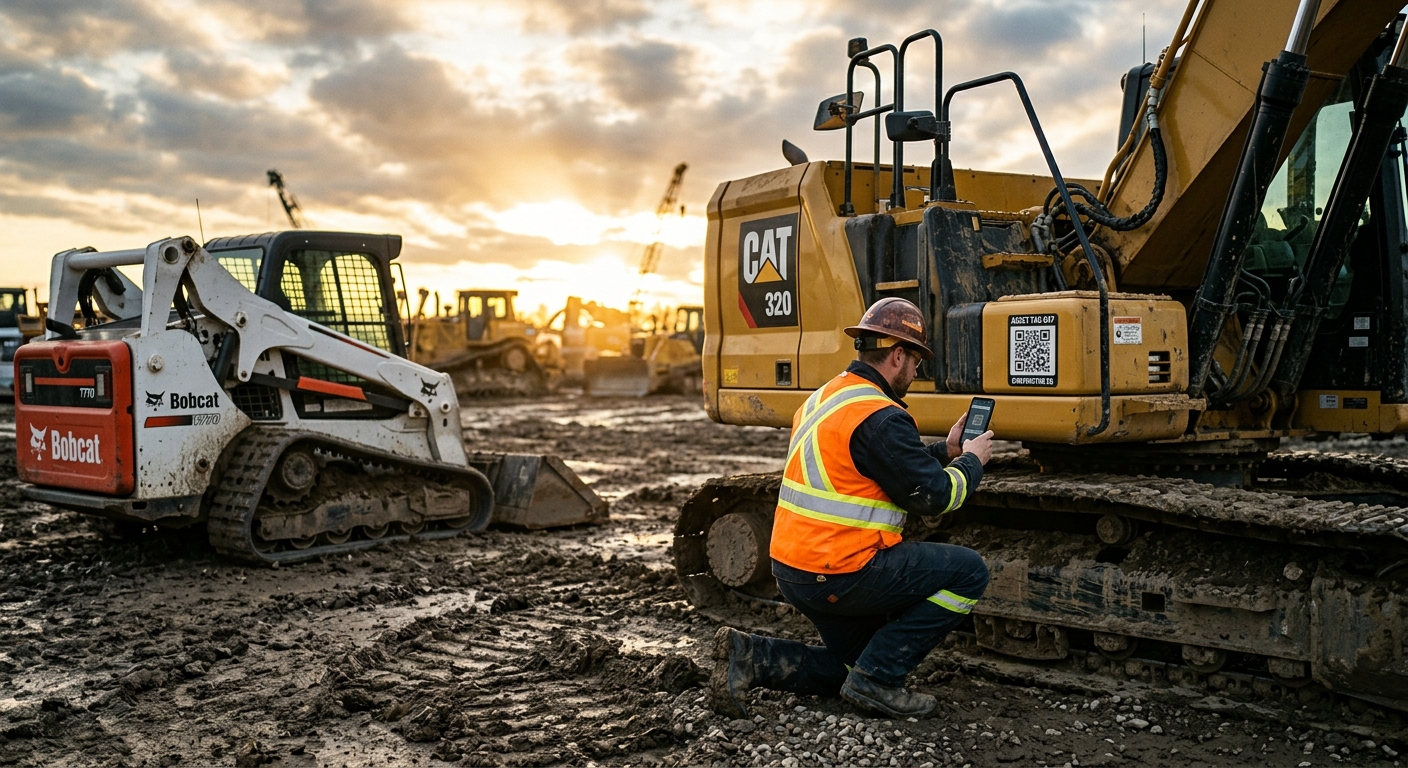
Heavy Equipment Asset Tagging and QR Code Guide
Learn how QR codes and asset tags help heavy equipment fleets track service, reduce downtime, speed inspections, and keep machine records organized.
Most fleets do not have a machine problem. They have an information problem.
The machine exists. The service history exists somewhere. The hour reading got written down by somebody. The operator noticed a leak. The technician replaced a hose. The purchase date is buried in an invoice folder. The serial number is technically on the machine if nobody painted over it or covered it in mud. Everything is available in theory, yet nobody can pull the full picture together fast when they actually need it.
That is where asset tagging stops being boring admin work and starts becoming real fleet discipline.
A solid tag system gives every machine, attachment, trailer, and support asset a clear identity. A QR code takes it further by connecting that identity to a live record. Instead of calling the shop to ask which skid steer needs the 500-hour service, an operator scans the tag and sees the machine record. Instead of texting three people to figure out whether a trailer already had a brake issue logged, a foreman scans the code and checks the note history. Instead of guessing which machine had the repeat hydraulic leak, the answer is sitting in the asset record.
This is not enterprise-software theater. It is basic operational competence.
Why asset tagging matters more than most fleets think
Most small and mid-sized contractors start with a naming system that grows accidentally. One excavator is “the 80.” Another is “the old Takeuchi.” A trailer is “the gooseneck.” A generator is “the one Austin had last week.” That works until the fleet expands, machines get replaced, crews rotate, or two similar assets live in different yards.
Then the cracks show up everywhere:
- Maintenance gets logged under the wrong machine
- Operators report issues with useless descriptions
- Parts get ordered for the wrong serial range
- Insurance records become annoying to verify
- Warranty questions take too long to answer
- Attachments disappear into the black hole of “somewhere on a job”
Asset tagging fixes the naming chaos by forcing consistency. Every asset gets a unique identifier. Every team member sees the same identifier. Every issue, inspection, and service log ties back to that same identifier.
That matters in the field because people are busy, tired, and usually halfway through three other problems. A system that depends on perfect memory will fail. A system that lets someone scan the machine and immediately land on the correct record has a shot.
It also matters financially. When you cannot trust your machine records, you cannot trust your maintenance planning, utilization reporting, repair history, or resale documentation either. Fleets do not become data-driven because they bought software. They become data-driven when they stop mixing up assets.
What a good heavy equipment asset tag should include
Plenty of tags are technically present and practically useless. A faded sticker with a random number on a dirty machine is not a system. It is decoration.
A useful asset tag should do four things well:
- Identify the asset clearly
- Survive the environment
- Be easy to find
- Connect to the right record
At minimum, a good heavy equipment tag should include:
- A short internal asset ID such as
EX-07orTRL-04 - A readable human label large enough to spot quickly
- A QR code that resolves to the machine record or issue form
- Optional backup info such as serial number suffix, company name, or service contact
The internal ID matters more than people think. It should be short, consistent, and boring. Boring is good. Fancy naming systems turn into a mess. Choose a simple format by asset type, then stick with it. Excavators, loaders, trailers, lifts, generators, and attachments should each follow a pattern that makes sense at a glance.
The tag material matters too. These machines live in mud, UV, diesel haze, wash-downs, vibration, and abrasion. A flimsy office label is dead on arrival. Use durable labels or engraved tags designed for field conditions. If the QR code cannot survive six months of grime and sun, it is not a real fleet tool.
Placement matters just as much. Put the tag where an operator or technician can find it without playing hide-and-seek. That usually means near the cab entry, service access area, tongue on towable equipment, or another obvious location that stays relatively visible.
- Use short, consistent IDs
- Stay readable after dirt, weather, and wash-downs
- Open the correct asset record instantly
- Live where crews can actually find them
- Use inconsistent naming nobody remembers
- Fade, peel, or crack fast
- Link to generic pages or dead forms
- Hide in awkward places nobody checks
QR codes vs basic number tags
Basic numbered tags are still better than nothing. They create a shared language around the fleet. If the whole team knows that SSL-03 means one specific skid steer and ATT-22 means one specific breaker attachment, you already cut down on confusion.
But QR codes are where the system gets genuinely useful.
With a QR code, the tag stops being a label and becomes a workflow shortcut. Scan it and you can:
- Open the machine’s maintenance history
- Log a defect against the correct asset
- Record hour readings
- Upload photos from the field
- Start a pre-use inspection
- Verify serial number and ownership details
- Check recurring problems before approving another repair
That is the big leap. A basic tag identifies. A QR code identifies and acts.
The common objection is that crews will not use it. Sometimes that is true. Usually it is because the workflow behind the scan sucks. If the QR code opens a slow, generic login wall or a form asking for seventeen fields before someone can say “left track leaking,” adoption dies immediately. If the code opens the correct asset page with two obvious next actions, adoption gets a lot more realistic.
QR codes also help with shared equipment. When multiple operators touch the same machine, memory-based reporting falls apart. A scannable tag keeps the record anchored to the asset instead of to whoever happens to remember what happened.
Where fleets screw this up
The first mistake is thinking the tag itself solves the problem. It does not. The tag is just the handle. The actual system behind it needs to be clean.
The most common failures look like this:
- The asset names are inconsistent from day one
- Tags get installed, but no one updates the records behind them
- QR codes point to generic homepages instead of specific assets
- Similar assets share vague labels like “Excavator 1” and “Excavator 2”
- Attachments never get tagged because the team only focuses on powered machines
- Damaged or missing tags stay missing for months
There is also the classic overcomplication trap. Some teams want the perfect taxonomy before they tag a single machine. That is backward. You do need a naming standard, but you do not need a doctoral thesis. Keep it simple enough to deploy this week.
Another huge miss is ignoring non-powered assets. Trailers, buckets, grapples, breakers, compactors, pumps, light towers, and service equipment all create downtime and replacement cost. If they can disappear, break, or require inspection, they deserve identity.
How to roll out asset tagging across a fleet
Rolling this out does not require a giant digital transformation speech. It requires one clean pass through the fleet and a bit of discipline.
Start with a master list:
- Asset type
- Internal ID
- Make and model
- Serial number
- Year if known
- Ownership or location notes
- Current hour or mileage baseline if relevant
Then define the naming convention before printing anything. For example:
EX-01toEX-99for excavatorsCTL-01toCTL-99for compact track loadersTRL-01toTRL-99for trailersATT-01toATT-99for attachments
Do not restart numbering every time a crew gets sentimental about a machine. The point is clarity, not personality.
Once the records are clean, print durable tags and install them intentionally. Then test every QR code before anyone relies on it. Seriously. Scan every one. Broken links on day one make the whole thing look half-baked.
Next, teach the workflow in one sentence: “If you need to inspect it, report it, or check history, scan the tag first.”
That sentence matters because rollout dies when people are forced to remember exceptions. Make the scan the default starting point.
It also helps to assign one person ownership of the system. Somebody needs to replace damaged tags, correct bad records, and make sure retired assets get archived instead of floating around forever like ghosts in the database.
Best use cases for QR codes in the field
The best QR workflows are the ones that remove friction from things crews already need to do.
Strong field use cases include:
- Pre-use inspections tied to the exact machine
- Service requests with photos already attached to the correct asset
- Hour entry or meter updates
- Trailer condition reports before transport
- Attachment check-in and check-out records
- Quick access to serial numbers, service intervals, and last repair history
- Warranty documentation when proof matters
This is also where QR codes help the shop, not just operators. A technician standing beside a machine should not have to dig through email to find previous work notes. A tag can bring that history up immediately.
For growing fleets, tagging also improves handoffs between field and office. The office gets cleaner records. The field spends less time describing which machine they mean. The shop sees better issue history. That is the kind of boring operational improvement that compounds hard.
How FieldFix helps keep tagged assets useful
QR codes are only powerful if the record behind them stays alive. That is where most paper-first systems fade out. The tag remains on the machine, but the information behind it goes stale.
FieldFix gives each machine a digital home for service logs, maintenance history, issue tracking, photos, and cost records. Pair that with a scannable tag, and the tag becomes a practical tool instead of a sticker someone stops noticing after a week.
Instead of asking:
- When was this machine last serviced?
- Is this a repeat leak?
- Which attachment is missing?
- Did anybody already report this issue?
You scan and know.
That speed matters because maintenance discipline is rarely destroyed by lack of intention. It gets destroyed by friction. If it takes too many steps to log issues or verify history, people stop doing it. If the machine record is one scan away, you have a real shot at consistency.
The best fleets do not just tag assets for inventory. They tag them so the next action is obvious.
Use FieldFix to pair asset tags and QR codes with maintenance logs, issue reporting, photos, and service history so your fleet is easier to manage in the field and in the shop.
Related Articles
August 26, 2026
Heavy Equipment Winch Maintenance Guide: Keep Cable Pulling Safe and Reliable
August 25, 2026
Heavy Equipment Wiring Harness Chafing Prevention Guide: Stop Electrical Gremlins Before They Shut Down a Machine

August 24, 2026