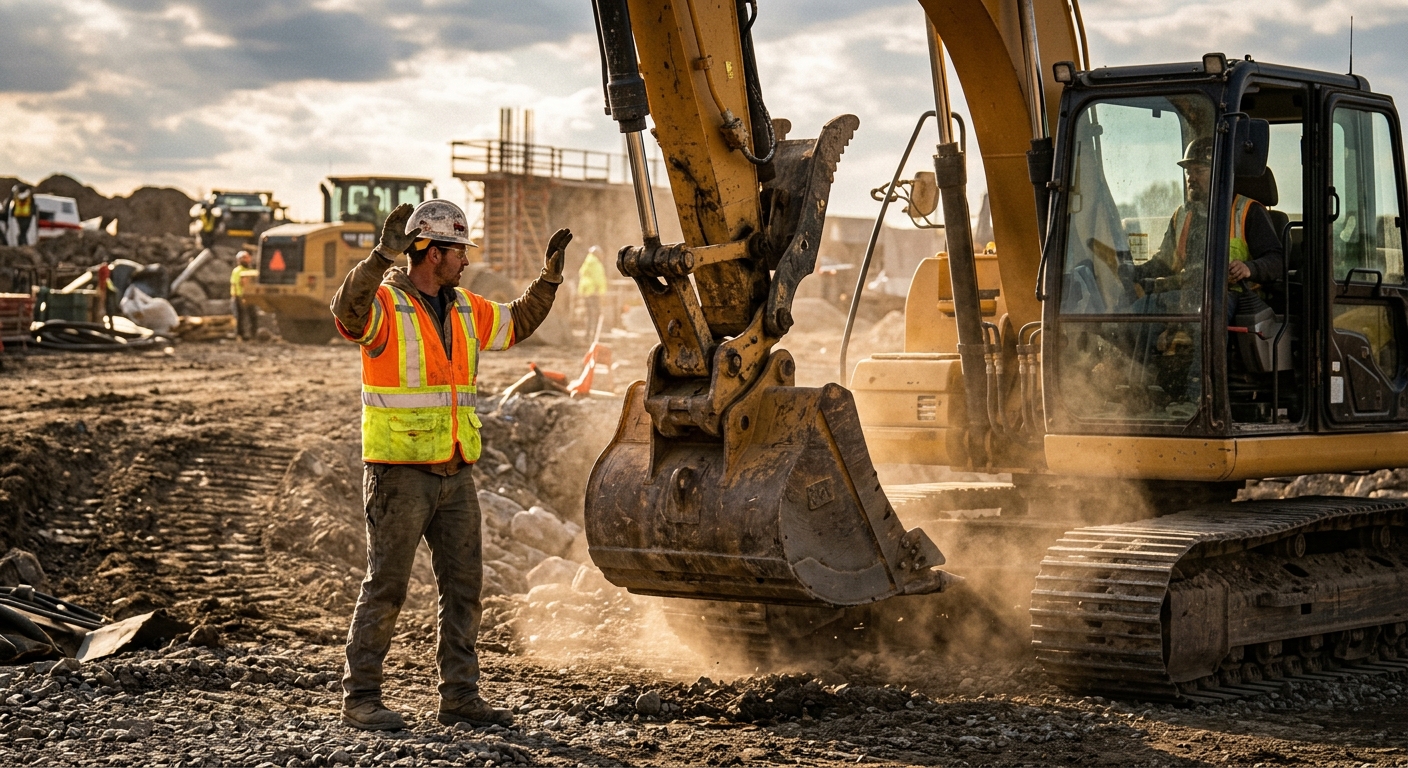
Heavy Equipment Spotter Hand Signals & Ground Communication: The Complete Safety Guide
Learn the hand signals, radio protocols, and site rules that help contractors prevent backing incidents, blind-spot strikes, and communication failures.
Key Takeaways:
- Spotter incidents usually come from inconsistent signals, poor positioning, and crews assuming everyone means the same thing
- Every site should standardize stop, swing, backup, travel, and emergency hand signals before work starts
- Radios help, but they do not replace clear line-of-sight and a single designated signal person
- The safest rule on any site is simple: if the operator loses sight of the spotter, the machine stops
- Good communication reduces property damage, near misses, downtime, and insurance headaches at the same time
Heavy equipment safety is usually discussed in terms of mechanical condition, maintenance intervals, inspections, and operator skill. All of that matters. But some of the ugliest incidents on a jobsite have nothing to do with a blown hose or a missed grease point. They happen because one person thought a signal meant “come ahead” while another person meant “hold up.”
Excavators, wheel loaders, dozers, telehandlers, haul trucks, and cranes all create blind spots that can swallow a worker, a pickup truck, a utility box, or a concrete form in seconds. When machine movement depends on a spotter, communication becomes a safety system just as important as mirrors, cameras, alarms, and interlocks.
That means crews need more than vague ideas like “just wave him back” or “use common sense.” They need standardized hand signals, radio rules, line-of-sight discipline, and a jobsite habit of stopping movement the second communication breaks down.
Why Ground Communication Fails
Most communication failures are not dramatic. They are ordinary. A laborer jumps in to help but is not the assigned spotter. A foreman points one direction while talking to someone else. An operator sees only half a motion through a dusty cab window. Two people give conflicting instructions at once. Nobody pauses to confirm who is actually in control of the move.
The root causes are usually one of these:
- No agreed signal language before the move starts
- Spotter standing in a blind spot or pinch point
- Multiple people signaling the operator
- Radio chatter drowning out critical commands
- Dust, rain, glare, or night work reducing visibility
- Operator continuing movement after losing sight of the spotter
Non-negotiable rule: If the operator loses sight of the spotter or cannot hear the designated radio call clearly, the machine stops immediately. Do not “finish the move” and hope the signal reappears.
The Core Spotter Hand Signals Every Crew Should Know
Every contractor can customize signal charts for specific equipment, but the fundamentals should stay boringly consistent. The goal is not creativity. The goal is instant recognition under stress.
Here are the core signals worth standardizing across your fleet:
1. Stop
Raise both hands high with palms facing the operator, then hold the position. This should be unmistakable and treated as the highest-priority command on site.
2. Emergency Stop
Use the same palms-up stop position, but make it bigger and more aggressive if needed. Some crews cross forearms overhead for extra clarity. What matters is that every operator recognizes it as an immediate hard stop.
3. Travel Forward
Face the operator and motion both arms toward your body in a controlled “come ahead” motion. Avoid sloppy one-handed gestures that can look like “keep swinging.”
4. Travel Reverse
Face the operator and extend both arms away from your body in a deliberate backing motion. If the equipment is backing toward you, your escape path needs to be established before you give the signal.
5. Swing Left / Swing Right
Point clearly in the desired direction and repeat the motion until the operator completes the move. On excavators and cranes, crews should define whether “left” and “right” are from the operator’s seat or the spotter’s perspective. Pick one standard and drill it.
6. Raise / Lower Attachment
Thumbs-up for raise and thumbs-down for lower works well when the motion is visible and slow. On noisy or crowded sites, larger arm motions are often better than small thumb signals.
7. Slow
Use both hands with palms down and a controlled lowering motion. This is useful when the move is correct but the speed is not.
8. Hold Position
One hand up with a firm palm-out signal can work, but only if your crew does not confuse it with stop. Some teams prefer using both hands to eliminate ambiguity.
Best practice: Print one signal chart for each machine class and keep it in the cab, in the shop, and in onboarding materials. Standardized signals beat tribal knowledge every time.
Where the Spotter Should Stand
A good signal from a bad location is still dangerous. Spotters need to stand where the operator can see them clearly, where they can see the hazard zone, and where they have an escape route if the machine keeps moving.
That usually means the spotter should:
- Stay outside the machine’s travel path
- Avoid standing between the machine and a fixed object
- Stay visible in mirrors, camera view, or direct line of sight
- Reposition before the machine moves into a new angle
- Keep enough distance to react without being so far away that signals become vague
Good Spotter Positioning
Do this:
- ✅ Stand off the corner of the intended travel path
- ✅ Keep both the operator and the hazard area in view
- ✅ Move early as the machine changes angle
- ✅ Wear high-visibility PPE that reads clearly through dust and glare
Avoid this:
- ❌ Standing directly behind a reversing machine
- ❌ Standing between a counterweight and a wall or truck
- ❌ Walking backward while signaling
- ❌ Letting another worker drift into the communication zone
For excavators, one of the most dangerous areas is the swing radius behind the house. For loaders and trucks, backing zones are obvious risk areas, especially around parked pickups, forms, trench boxes, and workers on foot. Spotters should never become part of the hazard they are supposed to control.
When to Use Radios vs Hand Signals
Radios are useful. They are not magic.
Hand signals are still the cleanest communication method when the operator has direct line of sight. No dead batteries. No clipped audio. No one stepping on the transmission. No confusion about which voice belongs to which machine.
Use radios when:
- The operator and spotter are too far apart for reliable hand signals
- Weather or dust limits visual clarity
- The move is complex and needs verbal distance or clearance calls
- Multiple blind-side hazards need constant updates
Use hand signals when:
- The spotter is clearly visible
- The move is short and controlled
- Noise levels make radio audio unreliable
- You want a backup communication layer even while radioing
Radio rule that saves headaches: Start every call with the machine identifier and the command. Example: “Excavator 12, stop.” Not “Hold up” or “Easy” with no context while three machines are moving.
The biggest radio mistake is treating open chatter like communication. Operators do not need stories. They need short, standardized commands. If the call is not clear enough to repeat back exactly, it is not good enough.
Building a One-Minute Pre-Task Communication Plan
Before any tight move near people, utilities, structures, or traffic, crews should do a one-minute communication check. This is one of the cheapest safety habits you can implement.
Cover these points:
- Who is the designated spotter?
- What signals or radio channel are being used?
- Where is the travel path and hazard zone?
- What is the stop-work trigger?
- What happens if sight or radio contact is lost?
That quick plan prevents the most common failure mode on active jobsites: multiple workers assuming they are helping while nobody actually owns the move.
Pre-Task Script Example
“Maria is the only spotter for this move. Loader backs to the trench box, then stops for final bucket positioning. Channel 3 on radios. If Maria disappears from view or says stop, machine stops immediately. No one else gives signals unless it’s an emergency stop.”
Common Mistakes That Cause Near Misses
Even experienced crews drift into bad habits, especially when production pressure rises. These are the mistakes worth correcting early:
Multiple signal people
This is chaos disguised as help. One operator should receive direction from one primary spotter for one active move.
Casual language
“Bring it over a touch” sounds harmless until the operator interprets it differently. Use defined commands, then confirm if needed.
Moving while uncertain
If the operator is not sure what the spotter meant, stopping is not overcautious. It is professional.
Ignoring environmental conditions
Night work, mud on camera lenses, glare, rain, and dirty cab glass all reduce signal quality. Crews should adjust position and pace accordingly.
No documentation after near misses
If communication almost failed, that is a process issue worth logging. A near miss is not a free pass. It is a warning.
A Realistic Jobsite Example
Picture a compact excavator trenching beside a building while a delivery truck idles nearby. The operator needs to swing spoils away from the wall, then back the machine a few feet to clear room for a utility crew.
Without a plan, one laborer points to the trench, the foreman motions the machine back, and the operator loses sight of both when the house swings. That is how people end up pinned, mirrors get clipped, and someone says, “I thought he saw me.”
With a plan, the move looks different:
- One spotter is assigned
- The truck driver is told to stay put
- The swing radius is cleared
- The spotter positions off the excavator corner with an exit path
- Backup motion is communicated with both hand signal and radio confirmation
- The operator stops the second the spotter steps out of sight
What the Good Outcome Looks Like
The excavator completes the reposition slowly, the utility crew stays outside the blind zone, and the team loses maybe 20 extra seconds. That tiny pause is far cheaper than a struck worker, a dented truck, or a claim that follows the job for months.
How to Standardize Signals Across Your Fleet
If your company runs multiple crews, this cannot live only in the foreman’s head. Standardization matters most when operators move between jobs, rentals enter the fleet, or new hires rotate in fast.
Build a simple system:
- Create one approved signal sheet for your common machine moves
- Use the same terminology in onboarding, toolbox talks, and ride-alongs
- Add communication expectations to job hazard analyses
- Review near misses during weekly safety meetings
- Keep a record of who has been briefed on site-specific communication rules
Hard truth: Cameras, mirrors, and alarms are backup aids. They do not excuse bad communication. If your crews are freelancing signals, you are one bad afternoon away from a preventable incident.
The contractors who get this right do not look flashy. They look disciplined. Their spotters stand in the right place. Their operators stop without ego. Their crews know that a clean, boring move is the goal.
Bring Communication Records Into FieldFix
Communication problems are operational problems, which means they should be documented like any other recurring issue. If one site keeps producing near misses during backing, loading, or trench work, your process needs more than a verbal reminder.
Use FieldFix to keep jobsite observations, maintenance notes, equipment history, and recurring issues tied to the machines your crews actually run. When a team reports visibility problems, damaged mirrors, failed backup alarms, or repeated blind-spot concerns, you can track the pattern instead of hoping someone remembers it next week.
Make Safer Moves With Better Field Records
FieldFix helps contractors track equipment issues, document recurring problems, and build cleaner operating habits across the fleet. If blind-spot risks, damaged cameras, or communication breakdowns keep showing up on jobsites, start recording them where your whole team can actually use the information.
Related Articles
September 4, 2026
Heavy Equipment Fall Service Planning Guide: How to Prevent Winter Downtime
September 3, 2026
Horizontal Directional Drill Maintenance: The Complete HDD Service Guide for Contractors
September 2, 2026